
Invoice chaos
Documents arrive at the last minute, in boxes or buried inside email threads from many different clients.
D27 Docs · Accounting automation
No chasing. No typing.
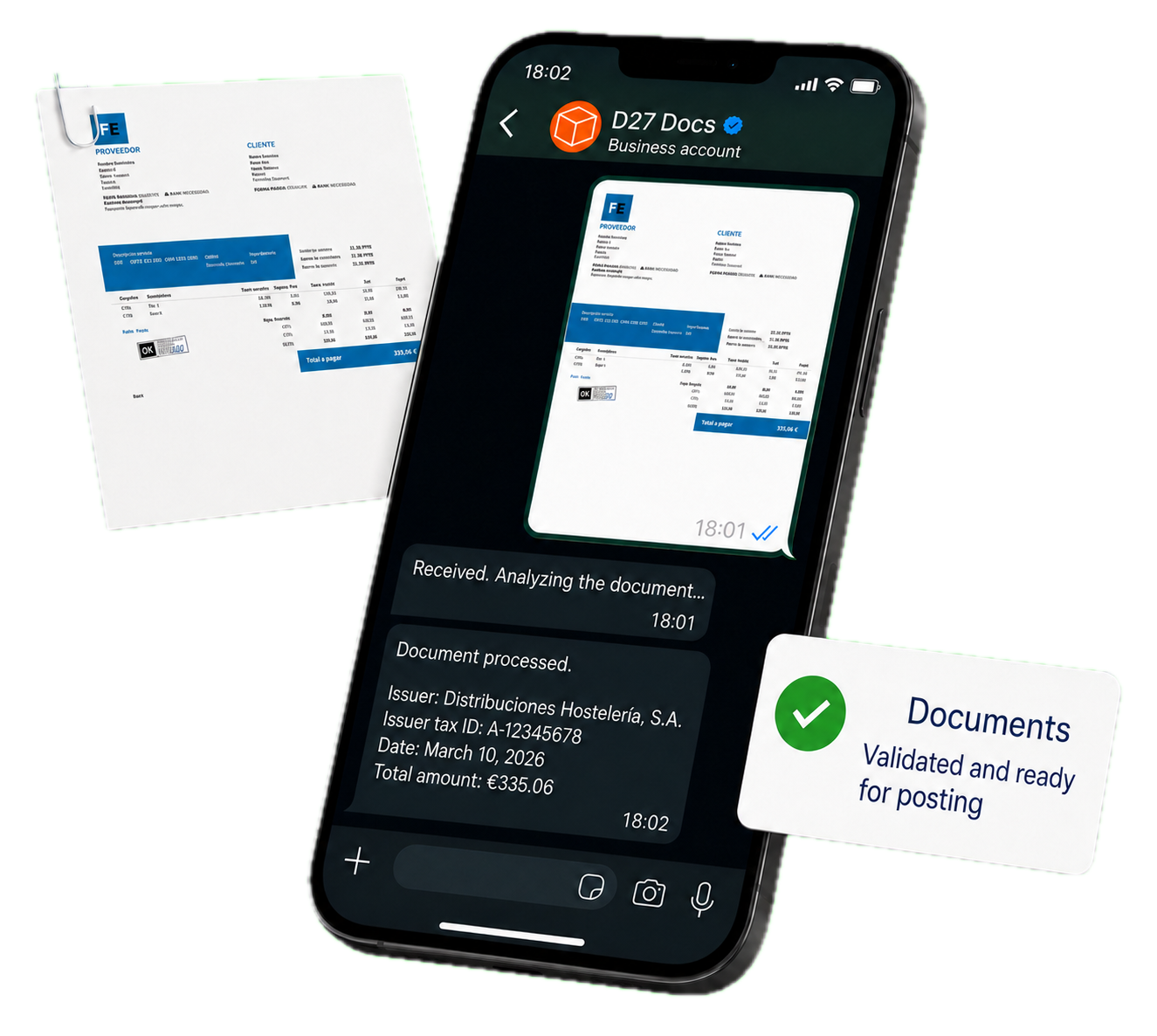
Receive documents through WhatsApp or email. D27 Docs interprets them, validates them and delivers them ready for your ERP.
Limited-time offer
Try it free for 1 month
Data entry and document chasing still consume the time your team should be using to review better and advise more.
Documents arrive at the last minute, in boxes or buried inside email threads from many different clients.

Your team spends hours typing amounts, dates and tax IDs by hand. Every single day.

Because documents tend to arrive at the end instead of steadily over time, your accounting status stays out of date.

When closing depends on rushed manual work, mistakes happen. Month-end closes stretch for days because nothing matches the first time.
A flow designed to preserve the client channel and transform the internal operation.
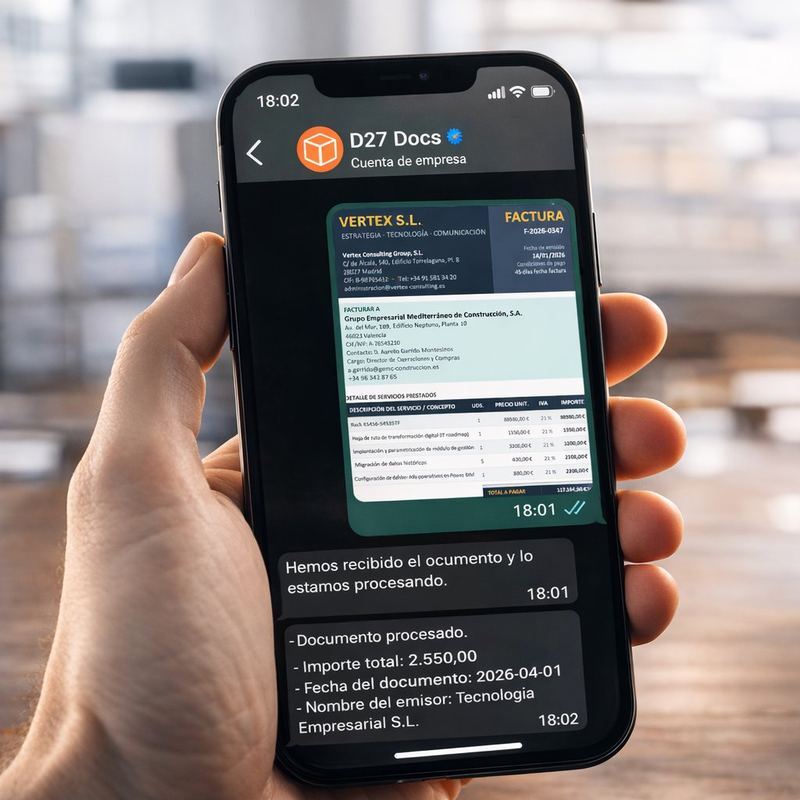
From their phone, whenever they can. Through WhatsApp or email. No app to install, no portals, no forms. The experience is natural and immediate.
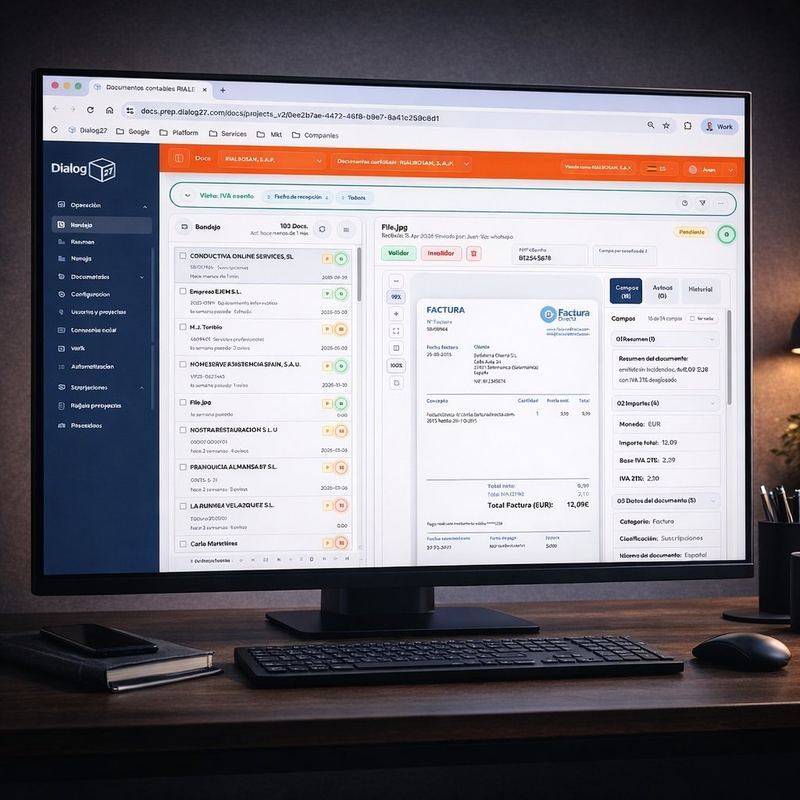
AI receives the document, checks its quality, extracts the key data (amounts, dates, issuer) and detects errors or missing data. All automated, and enriched with external sources such as the BORME.

You receive a clear, organised and traceable summary. Information extracted and ready to review and post. No searching, no downloading, no reorganising. Native integration with a3ERP, Holded and Odoo.
Native integrations




A clear product structure so commercial and finance teams speak the same language.
Promoción por tiempo limitado — 50% de descuento durante los primeros 6 meses
24
6 months at 50%, you save 149.70€. Then 49.90€/month.
The Basic plan includes:
Plan limits:
99
6 months at 50%, you save 599.70€. Then 199.90€/month.
Everything in Basic, plus:
More capacity:
199
6 months at 50%, you save 1199.70€. Then 399.90€/month.
Everything in Plus, plus:
More capacity:
If you need more document volume, more users or tailored integrations for a larger operation, let us talk.
Monthly pricing, taxes not included.
Additional token bundles can be contracted from any plan. They are only consumed when the monthly included tokens run out.
Operations improve when repetitive work disappears and validation becomes more visible.
Free your team from repetitive tasks and redirect that time to higher-value advisory work.
AI extraction removes typographical and transposition errors from manual work.
Scale your firm without growing headcount. Growth without hiring.
"At the firm we manage hundreds of invoices and receipts every quarter, and D27 Docs has simplified the work enormously. Our clients simply send the documentation through WhatsApp over the quarter and the system classifies it, checks it and extracts the key information. We have drastically reduced the time spent on manual tasks. Now we can focus on advising clients better instead of chasing paperwork."
Manuel Pérez
Tax, accounting and labour advisory firm · Naumanni SL
Get started
Request a D27 Docs demo and review with your team how work changes when intake, extraction and accounting preparation are automated.
Guided onboarding · ERP integration · Real validation with your current workflow
Clear answers about how D27 Docs receives, interprets, classifies and prepares documents for accounting teams and document operations.
D27 Docs is Dialog27’s intelligent document management solution. It lets companies receive documents through everyday channels such as WhatsApp and email, process them automatically with AI and OCR, extract their information and leave them organised, validated and ready to connect with management systems.
D27 Docs is used to automate processes in which a company needs to request, receive, review and register documents from customers, suppliers, employees or collaborators. It turns photos, files and scattered documents into structured, traceable information that is ready to use.
D27 Docs reduces the time spent chasing documents, downloading files, classifying them, checking readability, entering data manually and linking them to the right customer or case. It also helps avoid errors, duplicates and lost documentation.
D27 Docs includes document management capabilities, but it goes beyond storage. It also receives documents through conversational channels, checks their quality, identifies their type, extracts and normalises data and links everything automatically to the right process.
No. D27 Docs acts as an intelligent layer before the ERP or accounting software. It collects, interprets, organises and validates documents so the information reaches the management system ready for further processing or posting.
D27 Docs can receive documents through WhatsApp and email. Users can send photos, PDF files and other enabled formats without having to use complex portals.
No. Users can send documents through WhatsApp or email without installing an additional app or learning a new platform.
Yes. D27 Docs can process invoice photos and other document images. Before extracting information, it analyses image quality, readability and completeness.
Yes. D27 Docs can receive documents sent as files, including PDF documents, in addition to photographs taken with a mobile phone.
Yes. D27 Docs is designed to centralise documentation coming from many users, establishments, branches, franchises or collaborators. Each document can be associated automatically with the right person, entity, period, case or process.
D27 Docs can relate the document to identifiers authorised by the organisation, such as the sender’s phone number or email address. This makes it possible to link the file to a person, customer, company or case.
D27 Docs combines artificial intelligence and OCR to identify the type of document, assess its quality, extract relevant data, normalise the information and associate it with the right process.
A conventional OCR tool mainly recognises text. D27 Docs interprets the document inside a real process: it identifies its type, extracts relevant fields, checks defined conditions, relates the information to people or cases and prepares it for review or integration.
Depending on the document type and configuration, D27 Docs can extract information such as dates, amounts, names, identifiers, references and other metadata needed for the document or accounting process.
Yes. D27 Docs can determine whether the file belongs to the expected document type and classify it according to the categories defined for each process.
Yes. D27 Docs analyses document quality and readability before processing. It can also detect incomplete documents, incorrect files or documents that do not match what was requested.
When a document does not have enough quality, is incomplete or cannot be interpreted safely, D27 Docs can flag the issue so a new version is requested or the case is reviewed.
Yes. D27 Docs turns recognised information into structured, normalised data, making it easier to review, validate, export and integrate with other systems.
D27 Docs allows clients to send invoices and documents through WhatsApp or email throughout the accounting period. The solution receives them, classifies them, checks them, extracts the data and leaves everything ready for the team to review and continue with the accounting workflow.
D27 Docs can extract and structure invoice information, check it and generate a posting proposal. The final level of automation depends on the configured rules and the integration with each organisation’s accounting software.
D27 Docs can be used to process invoices, receipts and other tax or accounting documents. The exact document types and the required extracted fields are defined during process configuration.
Yes. D27 Docs can process invoices containing different VAT rates, IGIC, withholding taxes, reverse-charge VAT and equivalence surcharge. The system extracts and structures the relevant tax information so that it can be reviewed, validated and subsequently integrated with the accounting software or ERP.
No. D27 Docs reduces manual data entry through AI and OCR. The system extracts the information from documents and presents it in a structured way for validation, so the team does not need to transcribe every invoice from scratch.
The extracted information remains available in the document workspace so authorised users can check and validate it. The system preserves the link between the original document, the extracted data and the process status.
Not necessarily. D27 Docs automates the mechanical tasks of intake, classification and extraction, while the professional keeps control over validation and the cases that require accounting judgement.
Yes. By allowing clients to send documentation throughout the quarter and keeping it classified and available, D27 Docs reduces last-minute accumulation and the work required to collect everything at the end.
Yes. Teams can review the document process status and check which documents have been received, which ones were processed and which cases remain pending or need review.
Yes. D27 Docs provides structured, traceable and auditable storage. It links the original document with the sender, the extracted data, the validations performed and the current process status.
Yes. D27 Docs can automatically link documents with people, entities, phone numbers, periods, properties, orders, case files or other processes defined by the organisation.
D27 Docs is designed to integrate with leading ERP and accounting systems. The exact integration depends on the software used, its available interfaces and the scope defined in each implementation.
Yes. Both the documentation and the structured information can be made available for consultation, export or integration with the organisation’s systems.
No. Each organisation defines the documents it needs to collect, the authorised senders, the data to extract, the validations, the process rules and the integrations it needs.
D27 Docs is aimed at organisations that receive a high volume of documents and still spend time collecting, classifying or transcribing them manually. Potential users include accounting firms, professional services firms, commercial networks, procurement teams, real estate businesses, financial institutions and fintech companies.
No. In addition to invoice processing, D27 Docs can be used for delivery notes, supplier documentation, document onboarding, risk analysis, real-estate files and document collection processes for distributed networks.
Yes. D27 Docs can capture and process documents such as delivery notes, supplier invoices and delivery confirmations, and link them to the corresponding order or case file.
Yes. It can help receive and organise contracts, identity documents, certificates, receipts and other documentation submitted by owners or tenants, linking it to the relevant property or case file.
D27 Docs can be a fit if documentation arrives through multiple channels, time is lost chasing or classifying it, data is entered manually and then needs to be transferred to an ERP, accounting system or another internal tool.
You can request your trial through the website using the form you will find in the Request a demo section.